LightPlan 3.0, released in October 2026, lets you stand where you'll shoot. It adds Observer View (eye-level planning against the real skyline), AR Sky View, LightPlan on Mac, and plan links you can send to anyone, on top of the sun and moon planner photographers already use. LightPlan is free on iPhone, iPad, Mac and Android.
Observer View: see the shot from where you'll stand NEW PRO
Until now, planning apps showed you lines on a map and left the rest to your imagination. Observer View puts you in the scene. Drop a blue pin where you'll stand, and LightPlan flies you down to eye level to watch the sun or moon move across the real skyline — the ridge, the summit, the rooftops — at any time you choose.
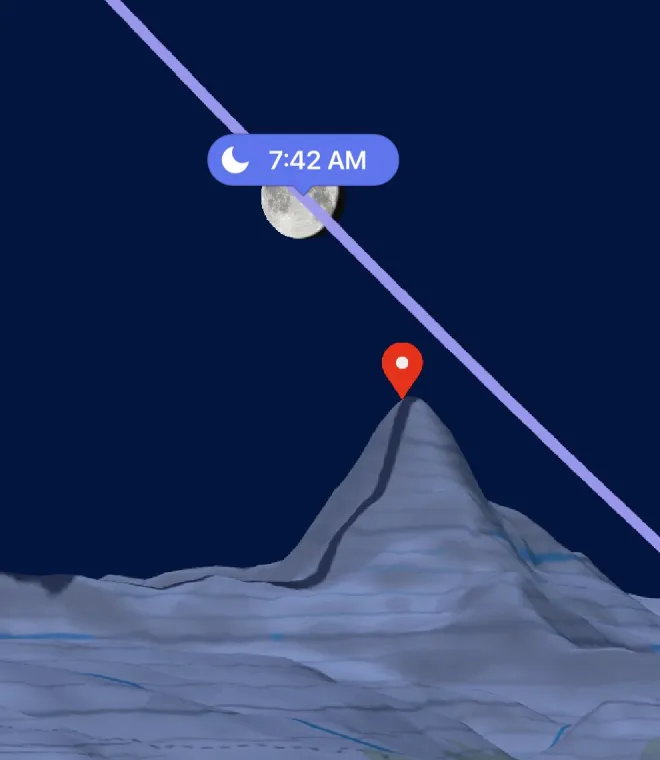
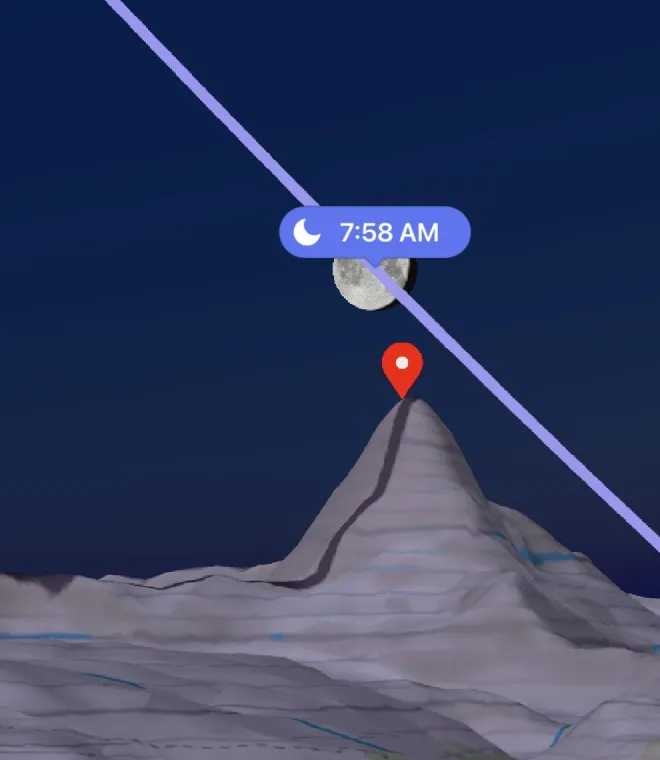
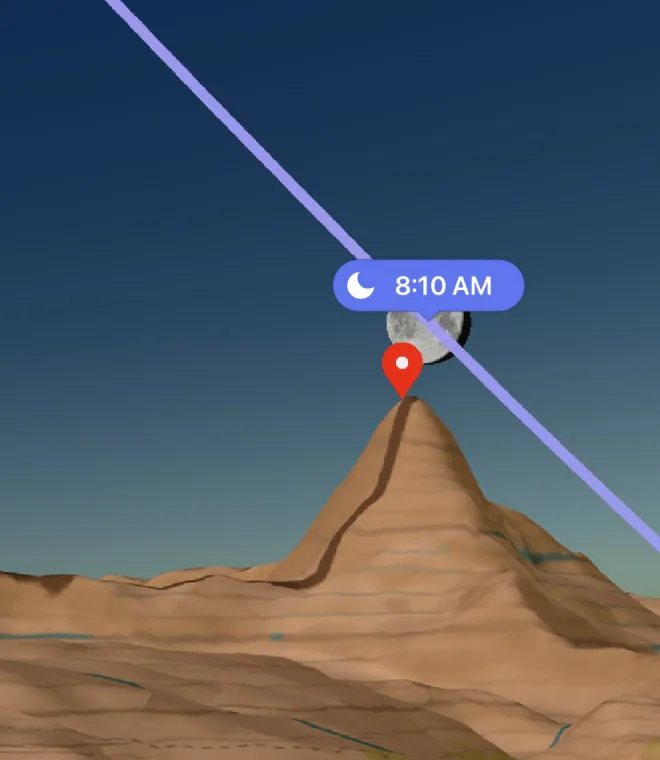
LightPlan Observer View: the Matterhorn from the Riffelsee, 25 January 2027. The moon settles onto the summit as blue hour turns to golden hour. Planned weeks ahead.
- Line of sight: a dashed line from you to your subject turns red where the land blocks the view, so you know before you hike whether you'll see it.
- Sky path: the day's path of the sun or moon is drawn far away, so ridges hide it exactly as they will on the day.
- Your lens: set a focal length from 14 to 600 mm (full-frame), with quick picks at 24, 50, 85, 200 and 400 mm. The longer the lens, the bigger the moon against the ridge.
- Eye height: standing height by default, up to 1000 m for a tripod on a wall, a balcony or a drone.
- Kept with your places: each saved location keeps its own observer pin, and a plan link shared from Observer View opens right in it.
Line up the moon behind a peak
- Put the red marker on the summit.
- Switch to Photorealistic 3D or Terrain 3D, tap the eye, and tap where you'll stand.
- In Quick Actions, set Track to Moon.
- Drag the timeline, and change the date, until the moon sits on the top.
AR Sky View: the sun and moon on the real sky NEW FREE
On location, hold up your phone to see the sun's and moon's paths across the real sky, hour by hour, from where you're standing. It follows the clock, or drag the timeline to see any other hour.
- The sun's path with a dot and a time at every hour; the moon's in blue.
- Arrows point the way to a sun or moon that's off screen.
- A compass accuracy readout, and Calibrate: centre the real sun or moon in the crosshair for a precise fix.
- With Pro, Show Milky Way draws the galactic core's path across tonight's sky.
AR Sky View works on iPhone, iPad and Android. Never look straight at the sun, with your eyes or through a camera.
LightPlan on Mac NEW
The whole planner on a big screen: your saved locations in a sidebar, the map in the middle, and the date, camera or lens controls and rise and set times in an inspector. Scroll over the timeline to move through the day, press ⌥⌘O for Observer View, and plan the trip at your desk.
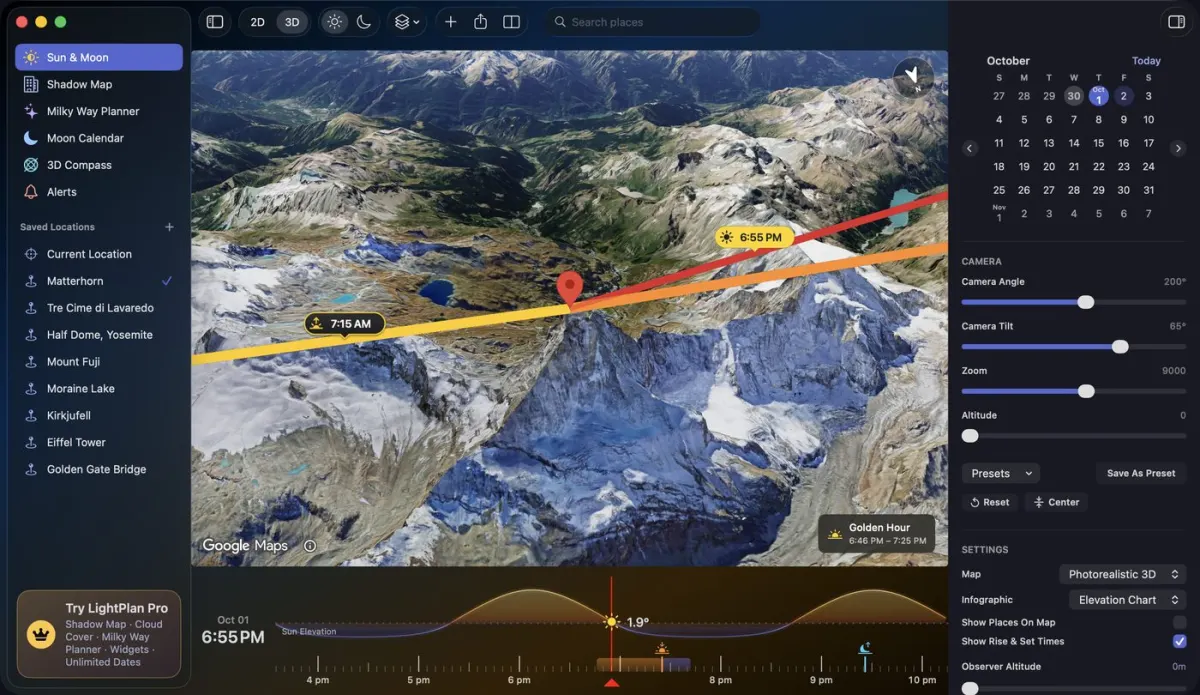
LightPlan on Mac, with the Matterhorn on the 3D map.
LightPlan for Mac comes from the same App Store listing as iPhone and iPad. Saved locations stay in step across all three through iCloud.
Plan links: share the exact shot NEW FREE
Send a friend, a client or your second shooter the exact place, time and view in one short link.
- Friends with LightPlan: it opens at the same spot, time and camera angle. Shared from Observer View, it opens in that view.
- Friends without it: they see the plan on the web on a 3D map, with the day's light windows and directions. No download needed.
- Add to Calendar: the selected time as a photo shoot, or the day's golden and blue hours.
- Directions: opens your maps app to the observer pin, or to the marker if there's no pin.
Plan links are kept for a year after the plan's date.
Everything else in LightPlan
3.0 builds on the planner photographers already use:
- Sun and moon lines for sunrise, sunset, moonrise, moonset and the selected time, with a draggable timeline in the location's own time zone.
- Golden hour and blue hour timed by the sun's elevation (golden hour from 6° above to 4° below the horizon; blue hour from 4° to 6° below), with the colour of the light. See our golden hour guide.
- Four maps: Photorealistic 3D, Terrain 3D lit by the hour with peaks labelled, Satellite 2D and Terrain 2D.
- Shadow Map (Pro): real shadows from buildings and terrain at any time.
- Weather layers (Pro): cloud cover and precipitation forecasts on the map, about five days ahead.
- Milky Way Planner with Best Milky Way Nights, ranking the next 30 nights by darkness, core height and moonlight.
- Moon Calendar with phases, eclipses and every stage of twilight.
- Alerts and Siri, so you hear about the light before it happens, and widgets (Pro) for your Home Screen.
Learn every feature in the LightPlan guide, available in 19 languages.
What's free in 3.0
LightPlan is free to use every day. AR Sky View, plan links, the 3D Compass, the Moon Calendar and all four maps are free, for today and the next 2 days. LightPlan Pro adds any date, Observer View, Shadow Map, weather layers, the full Milky Way forecast, every alert and Home Screen widgets (which you can try free for 14 days). Pro is $2.99 a month or $19.99 a year in the US, and starts with a free trial. See everything in Free and Pro.
Frequently asked questions
What's new in LightPlan 3.0?
LightPlan 3.0 adds four things: Observer View, which puts you at eye level where you'll stand to watch the sun or moon cross the real skyline; AR Sky View, which shows the sun's and moon's paths on the real sky through your phone's camera; LightPlan on Mac, with saved locations synced through iCloud; and plan links, which open your exact plan in the app or, for friends without it, on a 3D map on the web.
Is Observer View free?
Observer View is part of LightPlan Pro, which starts with a free trial. AR Sky View, the 3D Compass, the Moon Calendar and plan links are free. See Free vs Pro.
Does LightPlan have augmented reality (AR)?
Yes. AR Sky View, new in LightPlan 3.0, shows the sun's and moon's paths across the real sky, hour by hour, through your phone's camera. It's free on iPhone, iPad and Android. Seeing the Milky Way's core in AR is part of Pro.
Is LightPlan available on Mac?
Yes. LightPlan 3.0 runs on Mac from the same App Store listing as iPhone and iPad, and your saved locations stay in step through iCloud. AR Sky View needs a camera you can hold up to the sky, so it's on iPhone, iPad and Android only.
Can I share a plan with someone who doesn't have LightPlan?
Yes. Share Link turns the place, time and view into a short lightplan.app link. Friends with LightPlan open it in the app; friends without it see the plan on the web on a 3D map, with the day's light windows and directions. Sharing is free.
How do I get LightPlan 3.0?
Update LightPlan from the App Store (iPhone, iPad and Mac) or Google Play (Android), or download it free if you're new. No account is required.
Plan your best light with LightPlan
The sun, moon and Milky Way over real 3D maps — free to use.