LightPlan is the free Sun Surveyor alternative with AR included. Sun Surveyor's Live View needs the $9.99 full version. LightPlan's AR Sky View is free, and LightPlan goes on from where AR stops: plan from home on real 3D terrain and buildings, stand where you'll shoot in Observer View, and check the clouds and the best Milky Way nights in the same app, all from one easy screen.
Why photographers switch from Sun Surveyor
AR, free
AR Sky View is in LightPlan's free version on iPhone, iPad and Android. Sun Surveyor Lite has no Live View; AR comes with the $9.99 app.
Plan from home in 3D
Photorealistic 3D with Google's buildings and trees, and Terrain 3D lit by the hour, instead of a flat map.
Stand where you'll shoot
Observer View shows the scene at eye level with a 14–600 mm lens, and a line of sight that turns red where terrain blocks the view.
Weather on the map
Cloud cover and rain forecasts sit on the same map as the sun and moon, hour by hour, about five days ahead. Sun Surveyor doesn't list forecasts.
Milky Way nights, ranked
Every night gets a score from darkness, core height and moonlight, and Best Milky Way Nights ranks the next 30 at your spot.
A real Mac app
LightPlan runs natively on Mac. Sun Surveyor's iPad app isn't verified for macOS, and its Live View shows only the 3D Compass on a Mac.
Easy from the first minute
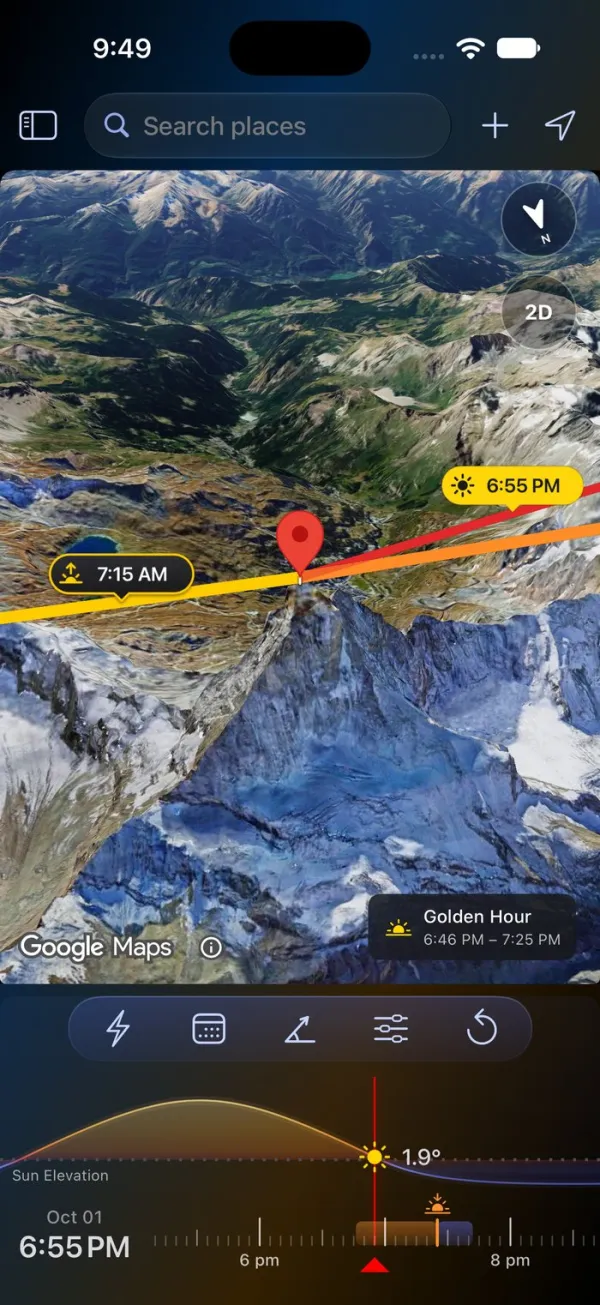
LightPlan is built so you can plan a shot without a tutorial. Your first plan takes three steps:
- Put the marker on your subject. Search for a place, or tap the map.
- Pick the day and time. Tap Date, then drag the timeline to the hour.
- Read the light. The lines point to the sun and moon, and a chip on the map says when it's golden or blue hour.
There are no panels to decode before you start. Times are always in the place's own time zone, the timeline is coloured like the light, and Product Tour replays the tips on the real controls whenever you want a refresher.
Sun Surveyor splits planning across separate modules: Live View, the 3D Compass, the Map, Street View and the Ephemeris. In LightPlan, the map, the lines, the light and the timeline are together on one screen.
AR on the real sky, free
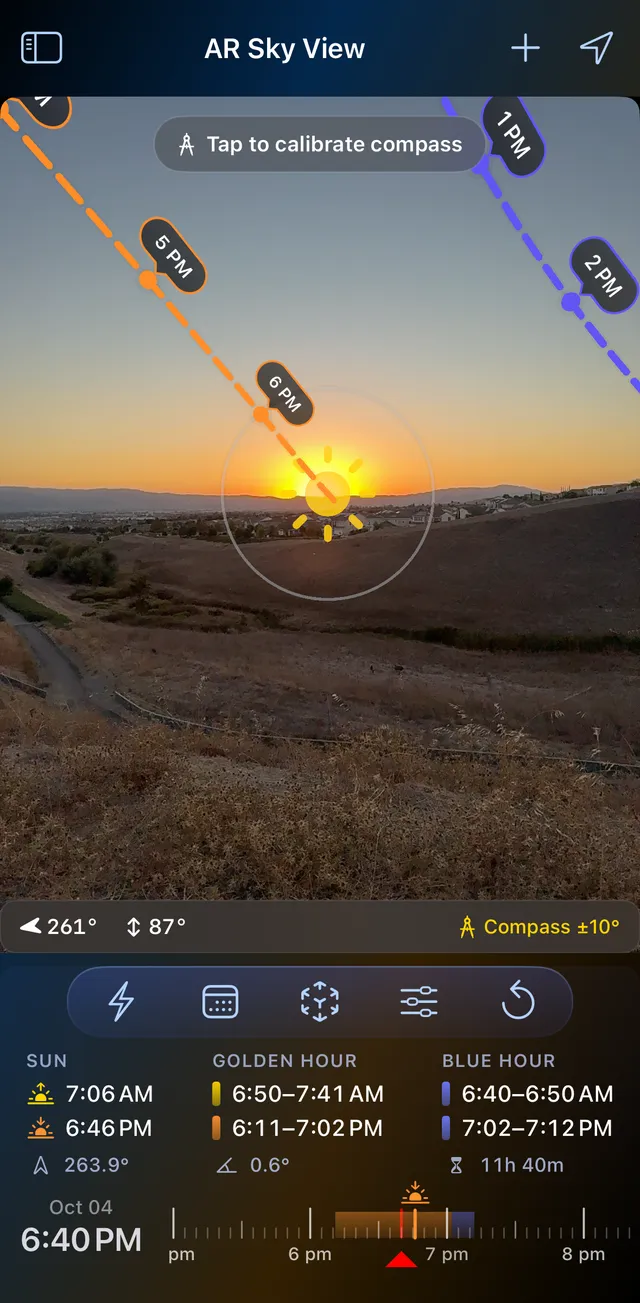
On location, hold up your phone: the sun's path is drawn across the real sky with a time at every hour, the moon's in blue, and the day's sunrise, sunset, golden hour and blue hour sit underneath for exactly where you're standing.
- Arrows point the way to a sun or moon that's off screen.
- Compass accuracy is always shown (±10° here); calibrate against the real sun or moon in the crosshair when it drifts.
- Drag the timeline to see any other hour.
- With Pro, the Milky Way core's path across tonight's sky.
Golden and blue hour are timed by the sun's angle (+6° to −4°, then −4° to −6°). AR Sky View is free in LightPlan; in Sun Surveyor, Live View is part of the $9.99 full version and isn't in Sun Surveyor Lite.
From home: see the shot before you go
AR answers "where is the sun from here, now?". Planning a trip needs a different answer: where the moon will be, from there, on a day you choose. Take a nearly full moon beside Half Dome at sunset, from the Yosemite Valley floor.
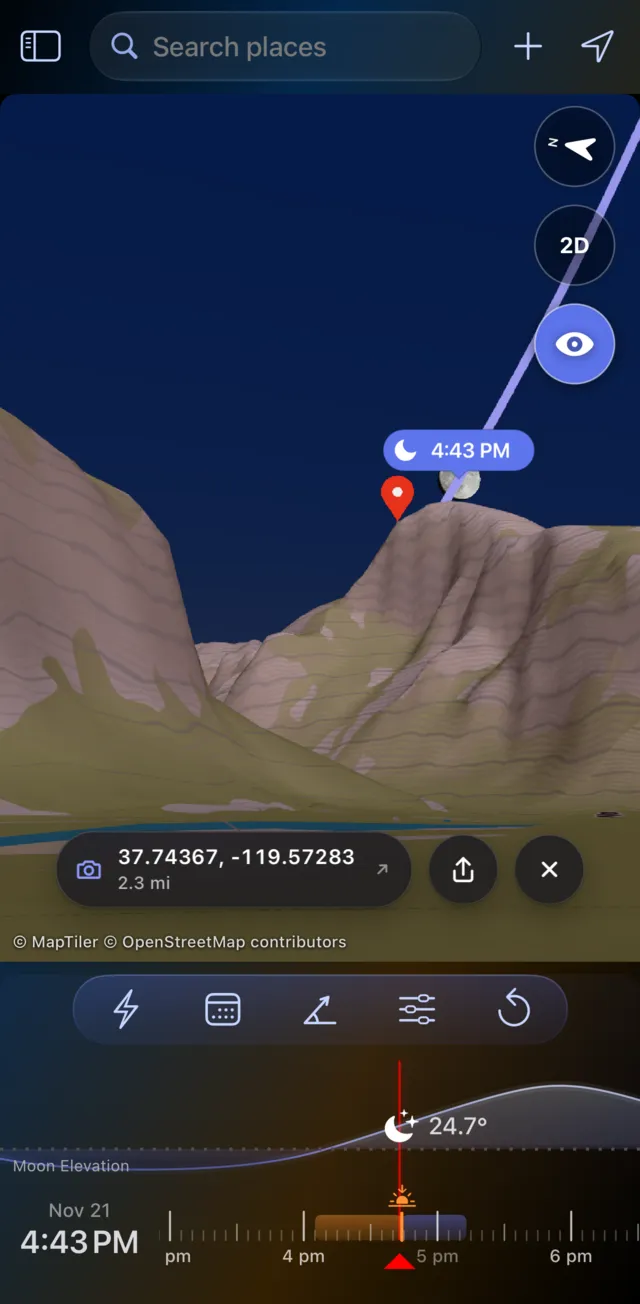
In LightPlan: see it
- Put the marker on the summit of Half Dome and switch to Terrain 3D.
- Tap the eye, then tap the valley floor where you'll stand.
- Set Track to Moon and step through November until the moon sits beside the summit at sunset. Observer View shows it against the real ridgeline, with the lens you'll use.
- Check the cloud forecast on the same map, then send the plan as a link.
In Sun Surveyor: work it out
- Set the observer and target on the map, and read the distance, elevation difference and angles.
- Use Position Search to find when the moon reaches that position.
- Check the scene in Street View where Google has a panorama, and the weather in another app.
Checked with an independent ephemeris: on 21 November 2026 at 4:43 PM, sunset in the valley, the moon is 91% lit at an azimuth of 92° and about 24° up. The summit is at 86°, 23° above you, so the moon sits just to its right.
Sun Surveyor gives you the numbers and a flat map. LightPlan shows you the scene: the ridgeline, the moon, the light and whether the sky will cooperate.
The Milky Way, scored night by night
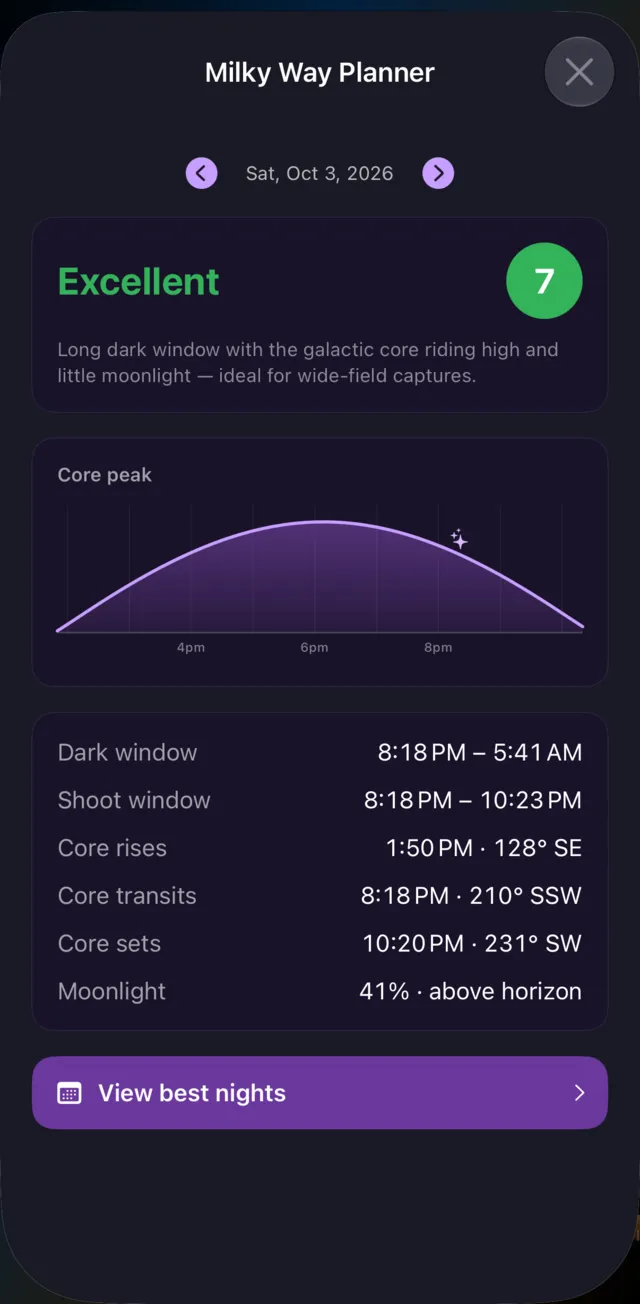
A great Milky Way night needs three things at once: real darkness, the galactic core above the horizon, and the moon out of the way. LightPlan's planner finds where they overlap and tells you, in plain numbers:
- Dark window: when the sun is at least 18° below the horizon.
- Shoot window: dark, with the core up, and with the moon down if it's half lit or more.
- The core: when it rises, peaks and sets, and which way to face.
- A score from how long it's dark, how high the core climbs and how little moonlight there is.
Best Milky Way Nights ranks the next 30 nights at your location (the top 3 are free), and an alert can warn you one to three days before a great night at any saved spot. Sun Surveyor includes Milky Way and star trail features for the date you pick.
Shadow Map: see where the light falls
Drag the timeline and every building, tree and hillside casts its real shadow at that moment. Here is San Francisco City Hall on the same day, six and a half hours apart:
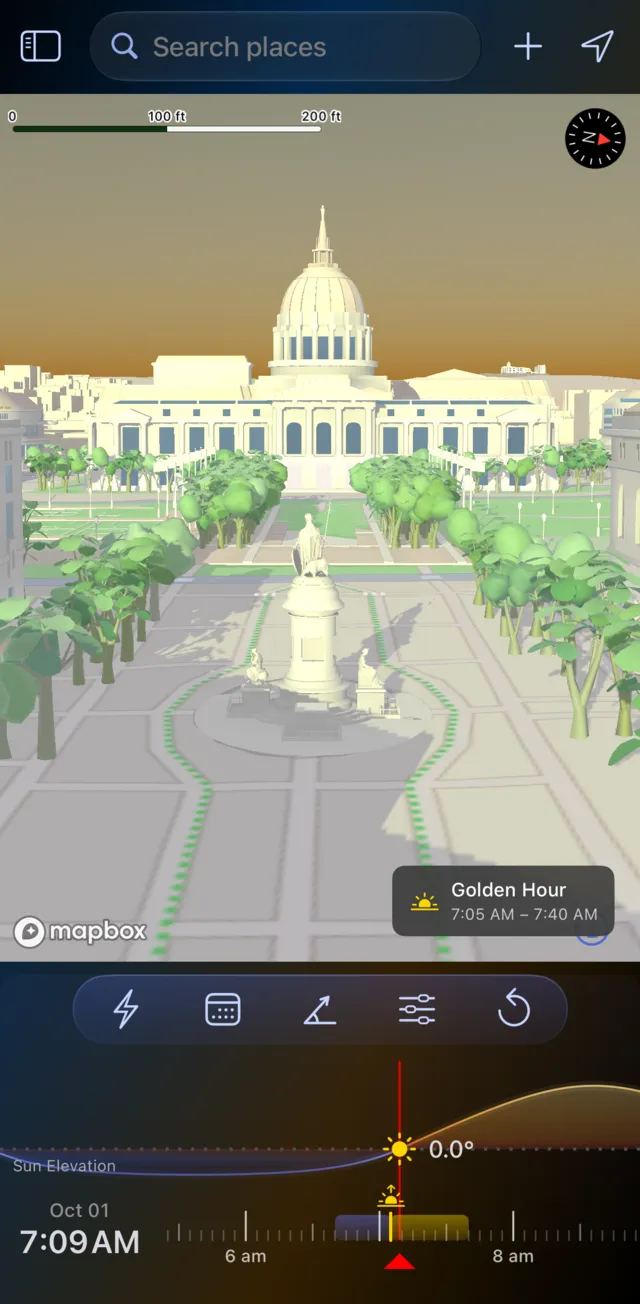
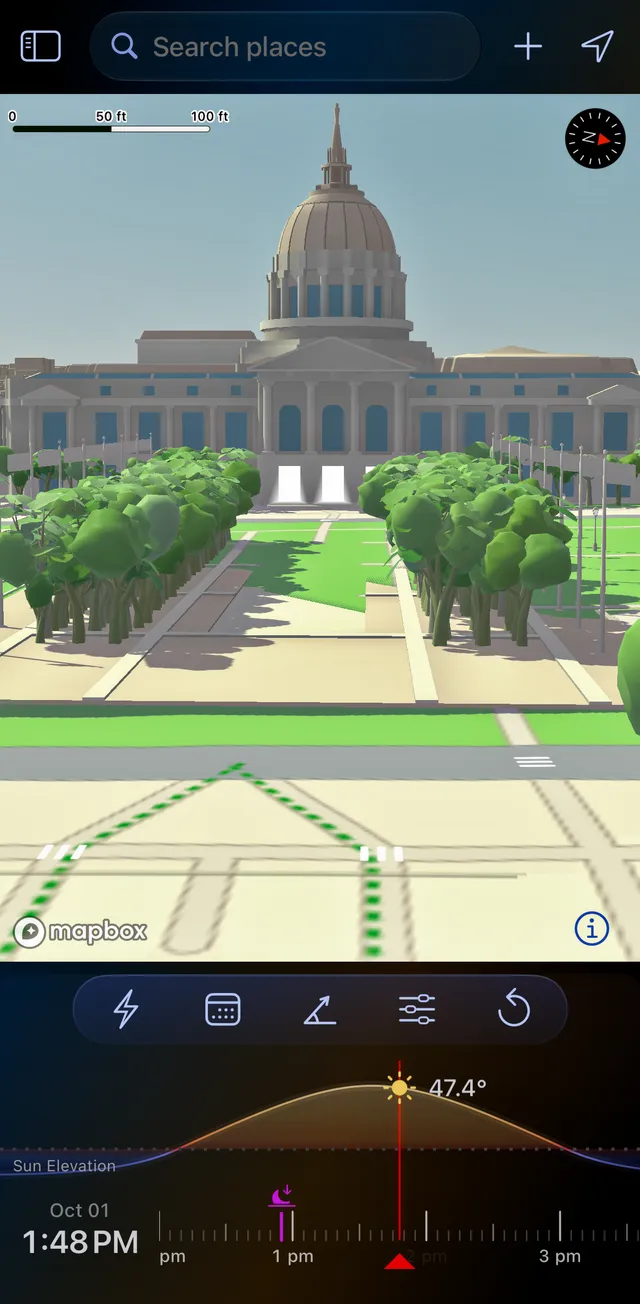
San Francisco City Hall, 1 October 2026.
- Find open shade for a portrait session, or the hour a facade is evenly lit with no hard shadows across it.
- Measure a shadow. A shadow object at the marker stands in for a person, a tree or a building; set its height and width, and LightPlan shows its Shadow Length and Shadow Ratio. At 1:48 PM here, a 6 ft person casts a shadow about 5.5 ft long.
- On iPhone Duo: Opened out and turned sideways, Split View shows the Shadow Map beside the main map.
- Beyond photography: when a garden, terrace or street gets sun, or where a new building's shadow will fall.
Sun Surveyor includes a shadow-length tool and shadows on its map. LightPlan draws the shadows of the whole scene, buildings and trees included, in 3D, and they swing round as you drag the timeline. Shadow Map is part of LightPlan Pro; open it from Quick Actions or the menu.
Share the plan with anyone
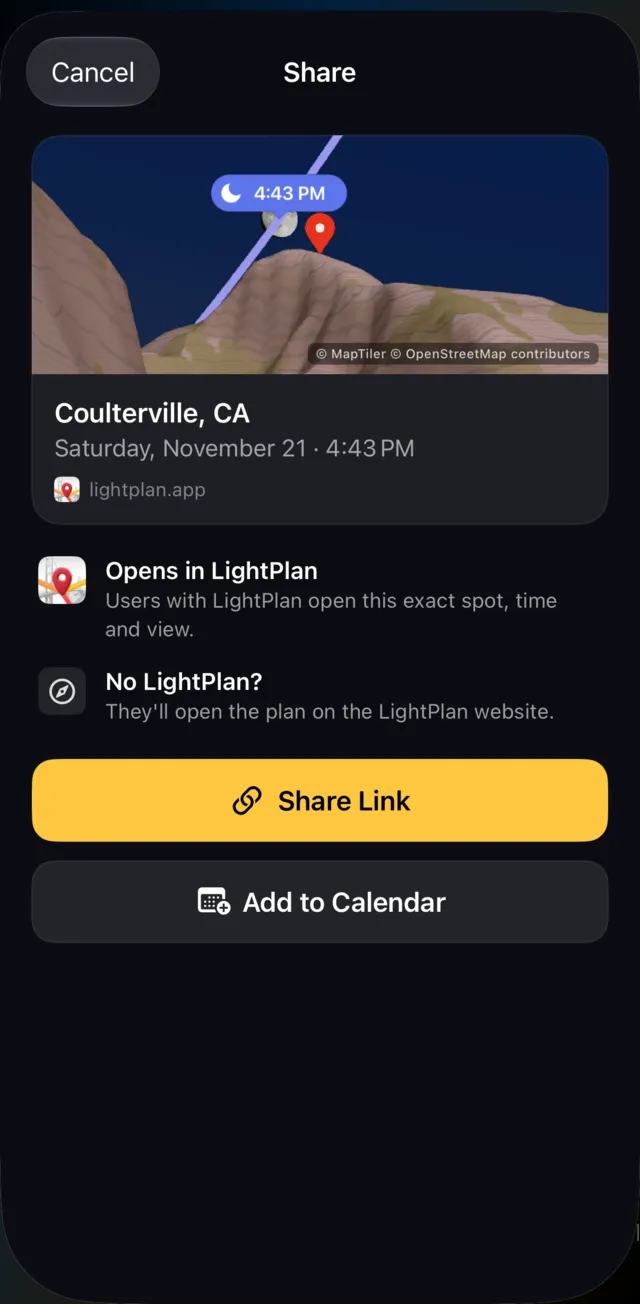
A shoot usually involves someone else: a second shooter, a client, a model, a friend driving out with you. In LightPlan, Share Link turns the exact place, time and view into one short link.
- They have LightPlan: it opens at the same spot, time and camera angle, or straight into Observer View.
- They don't: they see the plan on the web on a 3D map, with the day's light windows and directions. Nothing to install.
- Add to Calendar: the shoot time, or the day's golden and blue hours.
Sharing is free. Sun Surveyor shares plans and imports and exports KMZ and KML files.
More that sets LightPlan apart
- Terrain 3D lit by the hour: mountains glow warm at golden hour and cool at blue hour, with peaks labelled.
- Your spots on every device: saved locations, each with its view and observer pin, synced across iPhone, iPad and Mac through iCloud.
- Alerts before sunrise, sunset, golden hour, the moon and great Milky Way nights, from the moment itself to a day before, and Siri on Apple devices: "When is golden hour in LightPlan".
Feature by feature
| LightPlan 3.0 | Sun Surveyor | |
|---|---|---|
| Ease of use | Everything on one screen; first plan in three steps | Separate Live View, 3D Compass, Map, Street View and Ephemeris modules |
| AR in the free version | Yes — AR Sky View | No — Live View needs the full version |
| Price | Free; Pro $2.99/month or $19.99/year, with a free trial | $9.99 one-time; free Lite version |
| Planning map | Photorealistic 3D, Terrain 3D, Satellite 2D, Terrain 2D | Map with 3D view; Apple Maps 3D (beta, iOS) |
| Eye-level view from your spot | Yes — Observer View, 14–600 mm (Pro) | Street View, where available |
| Terrain line of sight | Yes — Observer View | Not listed |
| Cloud and rain forecasts | Yes — on the map (Pro) | Not listed |
| Milky Way nights scored and ranked | Yes — 30-night ranking | Milky Way and star trail features |
| Shadows | Shadow Map: buildings, trees and terrain (Pro) | Shadow-length tool; shadows on the map |
| Platforms | iPhone (incl. iPhone Duo), iPad, Mac (native), Android | iPhone, iPad, Android; iPad app on Apple silicon Macs |
| Plan links anyone can open on the web | Yes | Sharing; KMZ and KML files |
| Alerts | Sunrise and sunset free; every event with Pro | Calendar reminders from search results |
| Widgets | Pro, with a 14-day free trial | Yes |
| Street View | No | Yes |
| Automatic date suggestions | No | Yes — Position Search, Photo Opportunities |
| Offline | No | Yes — except the map and Street View |
Based on each app's website and store listings as of 14 October 2026; prices are US prices. Apps change, so check the current listing before you buy. "Sun Surveyor" is a trademark of its owner; LightPlan is independent and not affiliated with, endorsed by or sponsored by it.
When Sun Surveyor still makes sense
To be fair to a well-made app: Sun Surveyor works offline apart from its map, which helps where there's no signal. It shows sun and moon paths over Street View panoramas, lets you switch between the wide, standard and telephoto cameras in AR, and suggests dates with Position Search and Photo Opportunities. It's also a one-time $9.99. Some photographers keep it for quick checks in the field and plan their shots in LightPlan.
Bringing your spots across
LightPlan's search takes coordinates as well as place names, so you can move a saved spot by copying its coordinates and pasting them in. Both forms work: decimal degrees (37.80305, -122.44717, with minus for south and west) or degrees, minutes and seconds with N, S, E or W. Tap + to save it, name it and pick a folder. Each saved location keeps its view and, for Observer View, where you'll stand.
Two things that surprise people in their first week:
- Times are always local to the place, not to you. Plan an Icelandic sunrise from home and you see Iceland's clock time, as you'll live it there.
- A minute's difference from another app is normal. Apps treat the horizon and the bending of light by the air slightly differently. LightPlan's sun and moon positions are tested against the U.S. Naval Observatory and NASA JPL. If you shoot from high up, raise Marker Distance From Ground in Settings: from a height, the horizon drops, so the sun rises earlier and sets later.
Frequently asked questions
Is there a free alternative to Sun Surveyor with AR?
Yes. LightPlan's AR Sky View is free on iPhone, iPad and Android: hold up your phone to see the sun's and moon's paths across the real sky, with a time at every hour, and calibrate against the real sun or moon. The free version also includes 3D maps with terrain and buildings, golden and blue hour, the Moon Calendar and the Milky Way Planner.
Is Sun Surveyor free?
There's a free Sun Surveyor Lite with the 3D Compass, ephemeris, twilight times and solstice and equinox views. The full Sun Surveyor, with Live View (AR), the map, Street View and the moon, is a one-time $9.99 on the App Store and Google Play. LightPlan is free, AR included.
What does LightPlan do that Sun Surveyor doesn't?
LightPlan includes AR in its free version; plans on 3D maps with real terrain and Google's buildings and trees; puts you at eye level where you'll stand with your focal length in Observer View, with a line of sight that shows when terrain blocks the view; draws the shadows of the whole scene in Shadow Map; shows cloud cover and rain on the map; scores and ranks Milky Way nights; runs natively on Mac; and shares plans as links anyone can open on the web.
Which is better for planning from home, Sun Surveyor or LightPlan?
LightPlan. Sun Surveyor's map and Street View let you check sun and moon directions against a place. LightPlan's map is 3D, with real terrain and buildings, and Observer View shows the scene from where you'll stand with the lens you'll use, with the weather and Milky Way nights on hand.
Does Sun Surveyor work on Mac?
Its iPad app can run on Apple silicon Macs, but the App Store marks it as not verified for macOS, and on a Mac its Live View shows the 3D Compass instead of AR. LightPlan has a native Mac app; AR Sky View stays on iPhone, iPad and Android, where there's a camera to hold up.
Does LightPlan work offline like Sun Surveyor?
No. LightPlan needs an internet connection; Sun Surveyor works offline apart from its map and Street View.
Is LightPlan free?
LightPlan is free to use every day with no account. The free version covers today and the next 2 days: sun and moon lines and times, golden and blue hour, Photorealistic 3D, Terrain and 2D maps, AR Sky View, the 3D Compass, the Moon Calendar, the Milky Way Planner with the 3 best nights ahead, 5 saved locations, sunrise and sunset alerts, and plan links. LightPlan Pro ($2.99 a month or $19.99 a year in the US, with a free trial) adds any date, unlimited locations, Observer View, Shadow Map, weather layers, the full Milky Way forecast, every alert and widgets.
Try LightPlan free
AR Sky View, 3D maps and golden hour, free on iPhone, iPad, Mac and Android.