
The short version: Sun Seeker is a long-running sun tracker, and it's strong on site: it draws the sun's path through your camera and works offline. From the office, it gives you hourly arrows on a flat map. LightPlan draws the sun over Google's photorealistic 3D buildings, casts the shadows of the block around your subject, frames the shot at your focal length, and sends the plan to your client as a link, with AR on site too.
Should you switch from Sun Seeker?
Sun Seeker has been on the App Store since 2009, and it has lasted for good reason. Stand in front of a building, hold up your phone, and the sun's path is drawn over it, with the hours marked and the solstice paths if you want them. It works offline, and it answers "where will the sun be from here?" well. Its limits show up earlier in the job, before you've reached the site.
Planning from the office
Away from the property, Sun Seeker gives you a flat overhead map with an arrow for each hour. The directions are all there, but you're left to work out from the roofline which way the front faces. LightPlan draws the same directions over Google's photorealistic 3D buildings, so you're looking at the facade itself. For this kind of work, it's the biggest difference between the two.
Shadows from neighbouring buildings
Sun Seeker's phone app reports a shadow ratio, and its listings don't mention modelling the buildings around you. To see what a neighbour blocks, you stand on site and watch the AR path pass behind it. That's reliable, because you're looking at the real street, but it costs a visit. LightPlan's Shadow Map (Pro) casts the shadows of nearby buildings, trees and terrain at any time you pick. It's a model, so it's only as current as its 3D data, but you have an answer before you've quoted the job.
Scouting the frame
Both apps have AR, and AR only helps once you're there. Observer View (Pro) puts you on the 3D city from your desk, at street level, on a roof or at drone height, with a 14–600 mm lens. It's built from map data, so it won't show scaffolding or a van parked out front, but it's enough to judge a viewpoint and a composition. Sun Seeker's phone app lists nothing like it; Sun Seeker Pro for Mac can show the sun's path on a Photo Sphere, if you have one of that spot.
Clients and weather
Sun Seeker's map shares a screenshot or a location. A LightPlan plan link opens on a 3D map on the web, with the day's light windows and directions, so an agent or property manager can see the plan without the app. LightPlan also shows cloud and rain forecasts about five days ahead (Pro), on its 2D maps. Sun Seeker's listings don't mention forecasts.
On a Mac
The two take different routes here. Sun Seeker Pro is a separate app for shade analysis on Photo Spheres and site plans, and it reports sunlight hours with shade taken into account, which LightPlan doesn't do. LightPlan on Mac is the same planner as on your phone, with your saved locations synced through iCloud. For planning a shoot, that's the more useful of the two; for a sunlight study on a site plan, Sun Seeker Pro is.
The verdict
Stay with Sun Seeker if
- You mostly check the sun on site, often without a signal.
- You want it on your Apple Watch, or alerts for a compass heading.
- You want solstice and equinox paths in AR.
Move to LightPlan if
- You need to see how a building will look before you visit.
- Neighbouring buildings decide your light.
- Clients, agents or pilots need to see the plan.
The two also work side by side: plan in LightPlan, and keep Sun Seeker on your phone for quick checks on site. The fairest test is a building you know well. Plan it in both, and see which tells you more.
Which side of the building gets the sun?
It's the first question on any commercial shoot: the client wants the main entrance lit, and you need to know when. Here's San Francisco City Hall from Civic Center Plaza, on the morning of 1 October.
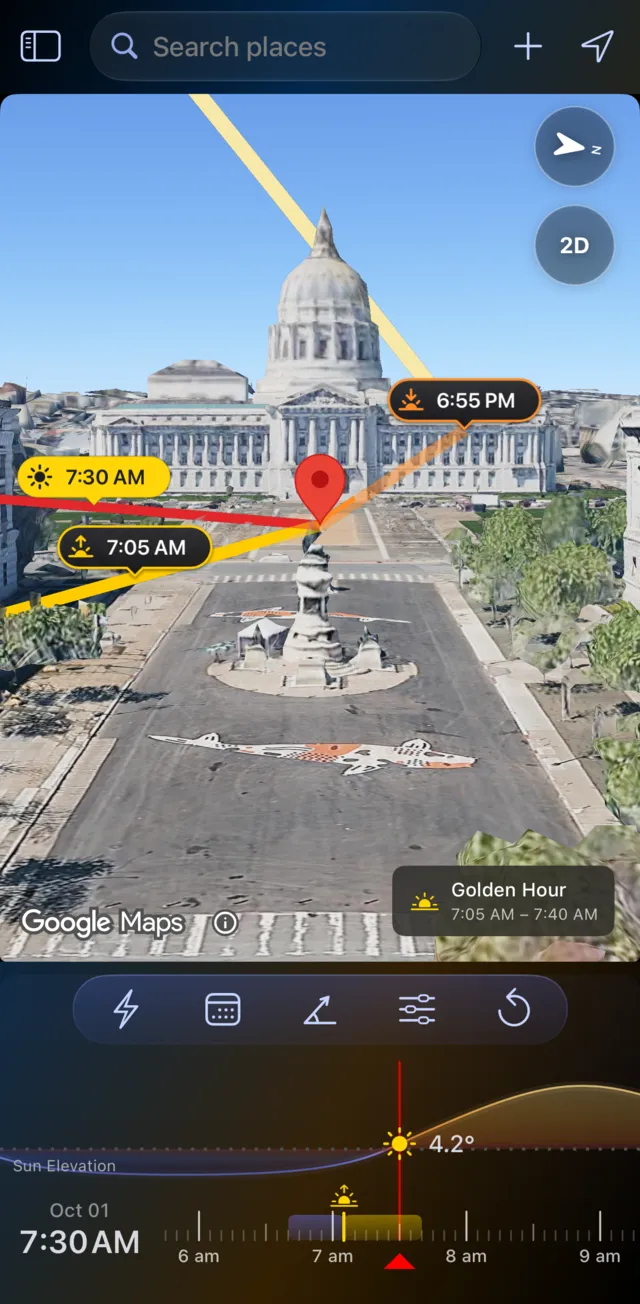
In LightPlan: see it
- Search for the address and put the marker on the building.
- Switch to Photorealistic 3D: you see the real building, its neighbours and the trees.
- Drag the timeline. The lines swing round the building, so you can watch the sun reach the front.
- Change the date to check the season, then send the plan to your client.
In Sun Seeker: work it out
- Search for the address in Map view and place the pin.
- Pick the date and read the hourly arrows around the pin.
- Work out from the roofline which way the front faces, and which hours reach it.
- To see what the neighbours block, go to the site and hold up the 3D view.
Checked independently with NOAA's solar equations: at 7:30 AM on 1 October 2026 the sun is at an azimuth of 97°, about 4° up. That's low and close to square-on to City Hall's east front.
Shadow Map: what the block does to your light
On a commercial street, the sun's direction is only half the answer: a facade can face the sun and still sit in a neighbour's shadow. In Shadow Map, every building, tree and hillside casts its shadow at the time you pick. Here is San Francisco City Hall on the same day, six and a half hours apart:
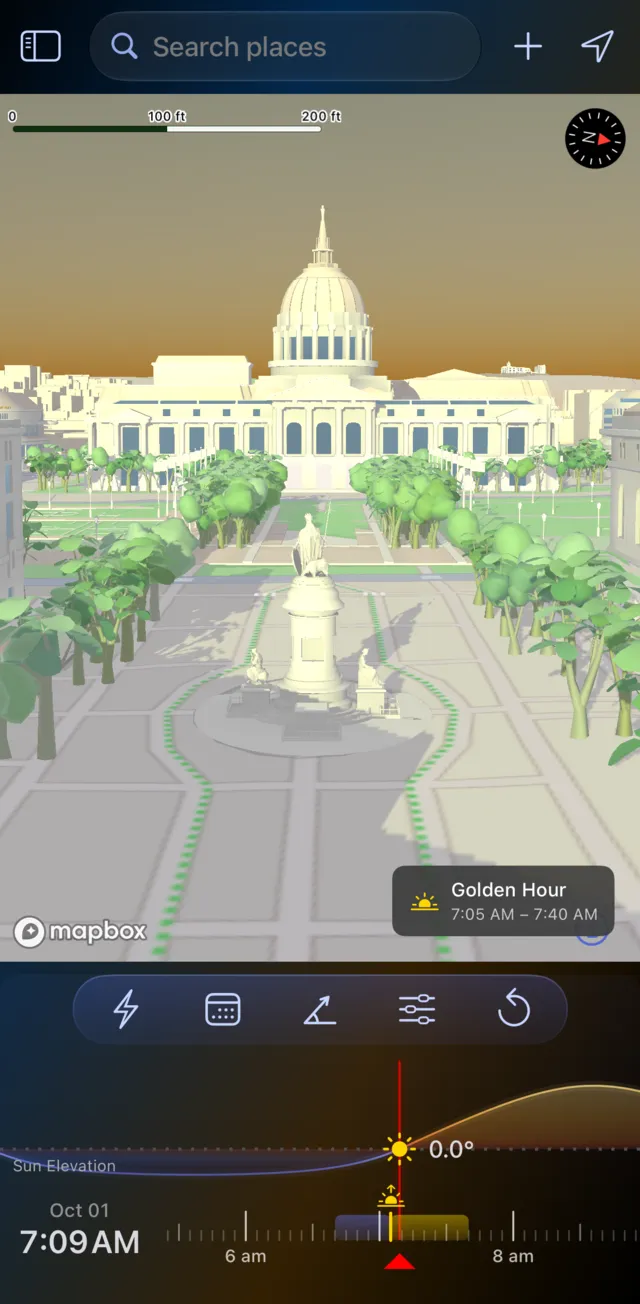
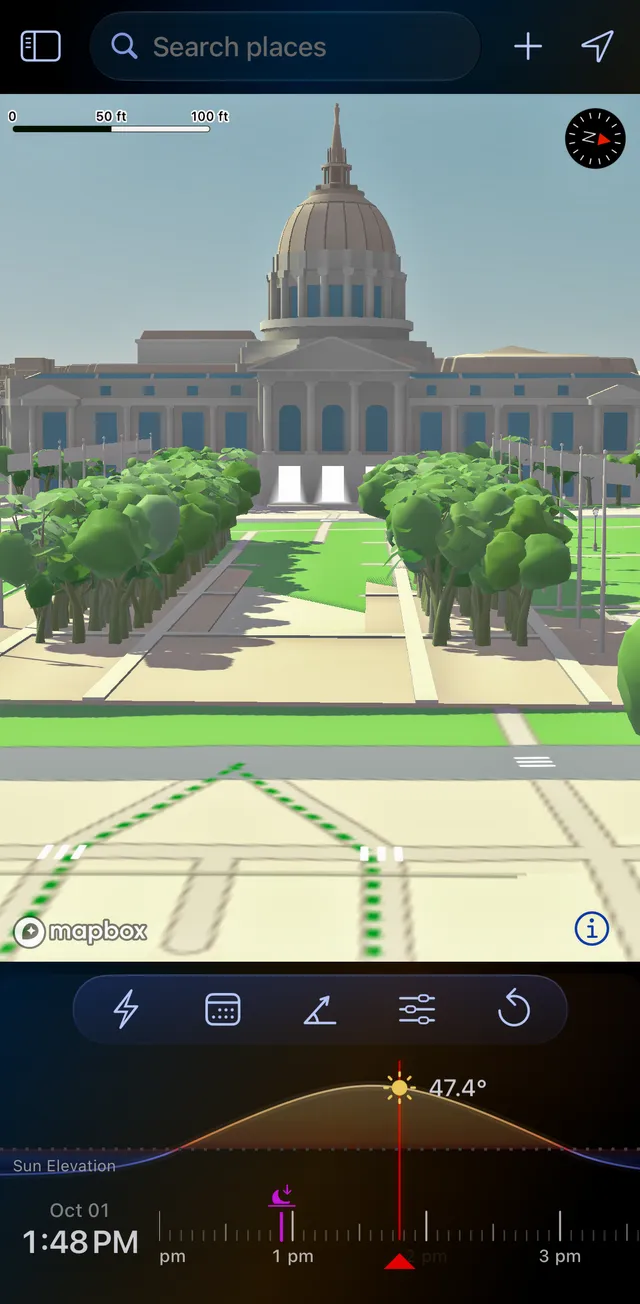
San Francisco City Hall, 1 October 2026.
- Clear the entrance: find when it comes out of a neighbour's shadow, and when the forecourt or terrace gets sun.
- Keep the facade clean: find the hour it's evenly lit, with no hard shadow lines across it.
- Measure a shadow: a shadow object at the marker stands in for a person, a tree or a building; set its height and width, and LightPlan shows its Shadow Length and Shadow Ratio.
Sun Seeker's phone app gives you a shadow ratio and alerts for shadow periods. To see what blocks the sun, its developer's guide has you stand at the spot and watch the AR path pass behind the building. Sun Seeker Pro for Mac can work out shade from a Photo Sphere, so you need a 360° image of that exact spot first. LightPlan's Shadow Map is there for any address on any date, from your desk (Pro).
Shadow Map draws on Mapbox's 3D buildings and trees, and 3D map data isn't live, so a tower that's just gone up may not be there yet. Treat it as your plan, and confirm it on site. For the full workflow, see our guide for architecture and real estate photographers.
Frame it from the street, a roof or a drone
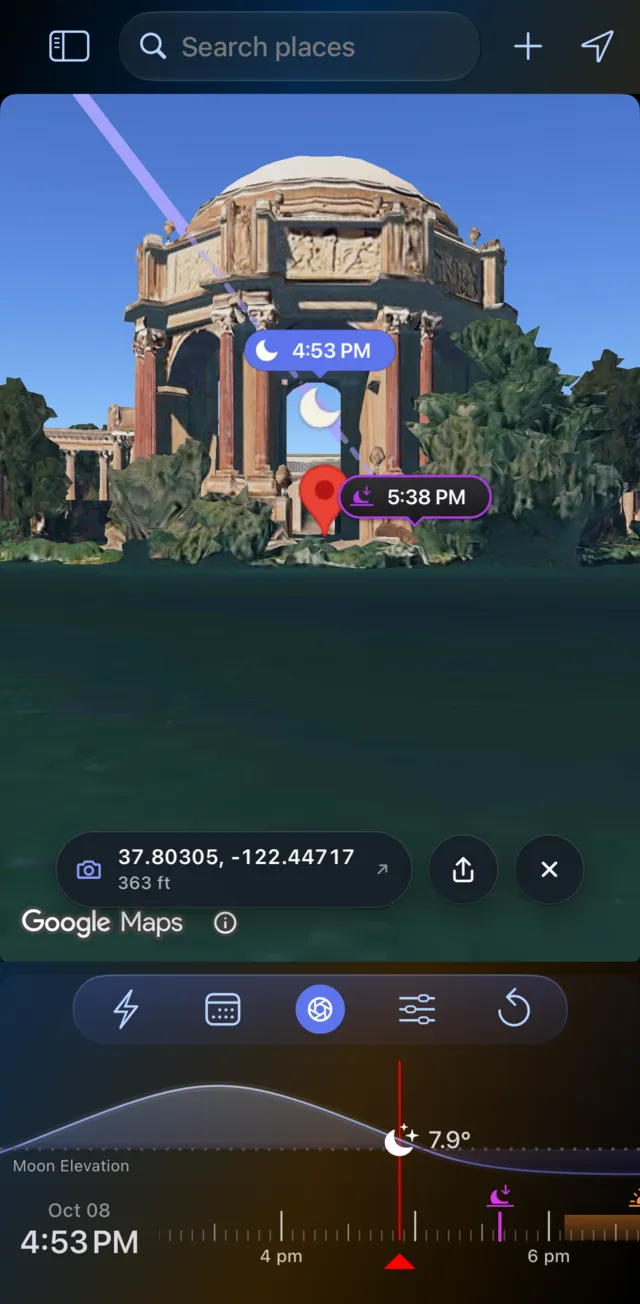
Observer View puts you where you'll set up, at eye level on the photorealistic 3D city, so you can check the composition before you quote the job or send a drone pilot out (Pro).
- Your lens: a focal length from 14 to 600 mm (full-frame), from a wide establishing shot to a compressed detail.
- Your height: standing height by default, or up to 1000 m to preview a balcony, a rooftop or a drone position.
- The sun in the frame: its path is drawn across the real skyline, for a sun star off a corner of the building.
- Your line of sight: it turns red where the land blocks the view. Buildings don't turn it red, but you can see them in the view.
Sun Seeker's AR shows the sun over what your phone's camera sees, so it needs you on site, and its listings don't mention a lens or focal length control.
Twilight exteriors, with the forecast alongside
Both apps time golden hour, blue hour and twilight, and both can remind you. LightPlan adds what you need to commit to a date:
- The window on the map: a chip says when it's golden or blue hour, and the timeline is coloured like the light.
- Cloud and rain: forecasts on the Satellite 2D and Terrain 2D maps, tied to the timeline, about five days ahead (Pro).
- Add to Calendar: the shoot time, or the day's golden and blue hours, in your calendar.
- Directions: your maps app opens to where you'll stand.
Send the plan to the agent
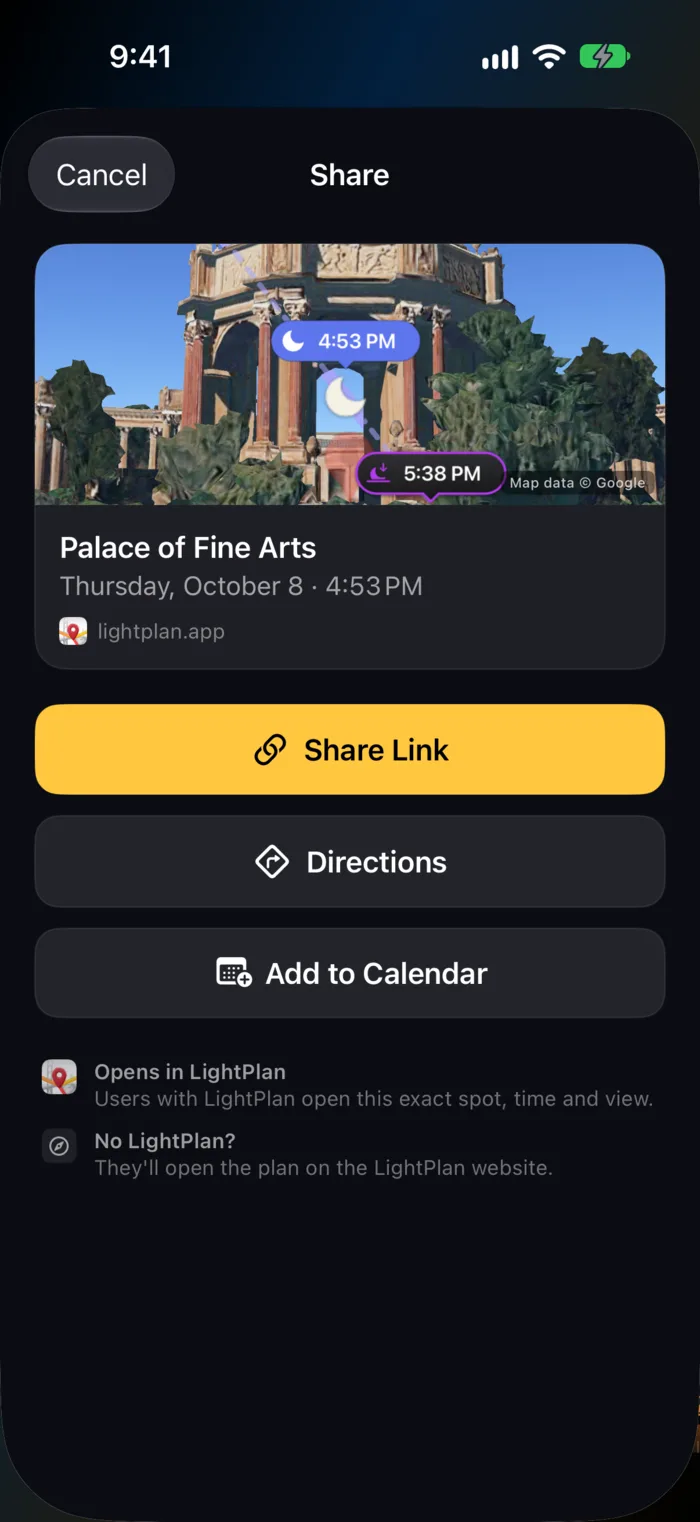
A commercial shoot involves other people: the agent who books the slot, the property manager who unlocks the doors, the drone pilot or second shooter. Share Link sends the exact place, time and view as one short link.
- They don't need the app. The link opens on the web on a 3D map, with the day's light windows and directions.
- With LightPlan, it opens at the same spot, time and camera angle, or straight into Observer View.
Sharing is free. In Sun Seeker, the map shares a screenshot or a location.
You keep AR on site
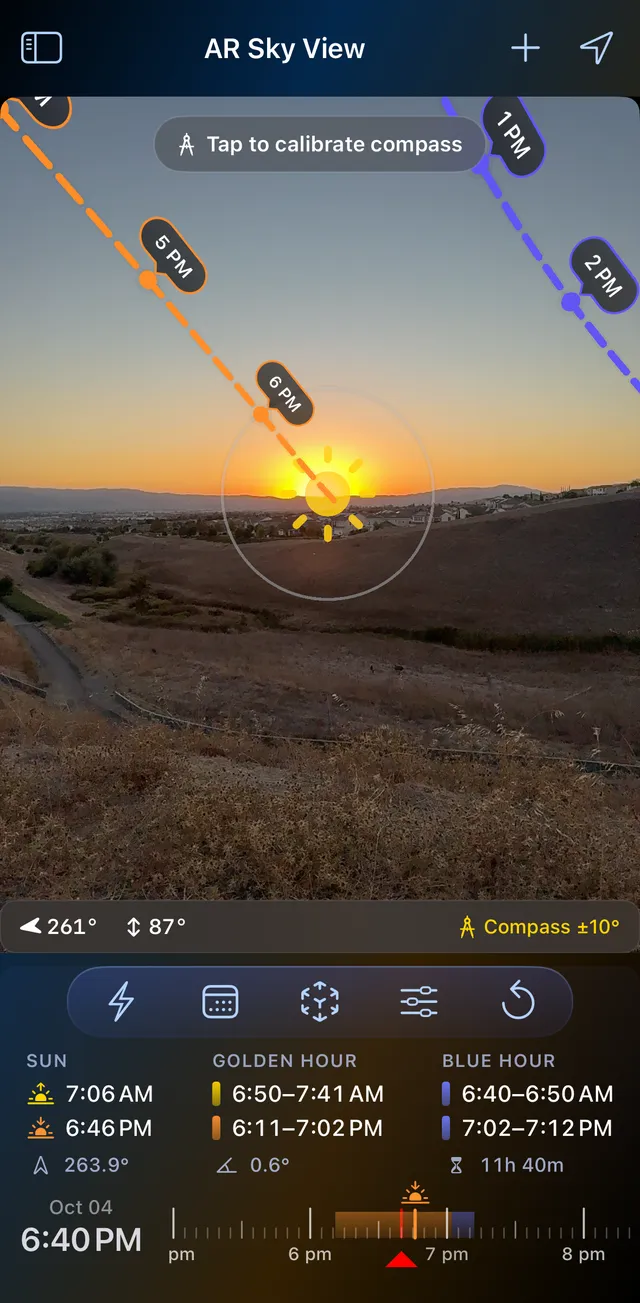
Switching doesn't mean giving up the view you know. Hold up your phone at the property and AR Sky View draws the sun's path across the real sky, with a time at every hour. It's free on iPhone, iPad and Android.
- The moon's path is in the same view. In Sun Seeker, the moon is a separate app, Moon Seeker.
- Arrows point the way to a sun or moon that's off screen.
- Compass accuracy is always shown; calibrate against the real sun or moon when it drifts.
- Drag the timeline to see any other hour.
Feature by feature
| LightPlan 3.0 | Sun Seeker | |
|---|---|---|
| Sun direction over real 3D buildings | Yes — Photorealistic 3D | Flat overhead map with hourly arrows |
| Shadows of surrounding buildings | Yes — Shadow Map (Pro) | Not listed for phones; Sun Seeker Pro (Mac) from a Photo Sphere |
| Shadow length and ratio | Yes — shadow object (Pro) | Yes — shadow ratio |
| Preview the frame with your lens | Yes — Observer View, 14–600 mm (Pro) | Not listed |
| Rooftop and drone viewpoints | Yes — up to 1000 m (Pro) | Not listed |
| Cloud and rain forecasts | Yes — on the map (Pro) | Not listed |
| Plan links anyone can open on the web | Yes | Map shares a screenshot or a location |
| Mac | Full planner, with saved locations synced through iCloud | Sun Seeker Pro: a separate app for Photo Sphere and site plan analysis |
| AR on site | Yes — AR Sky View, free, sun and moon | Yes — 3D view, sun |
| Golden hour, blue hour, twilight | Yes | Yes |
| Price | Free; Pro $2.99/month or $19.99/year, with a free trial | $11.99 on iPhone and iPad, $8.99 on Android, one-time; Sun Seeker Pro for Mac $29.99 |
| Any date | Pro; free covers today and the next 2 days | Yes — included |
| Platforms | iPhone (incl. iPhone Duo), iPad, Mac, Android | iPhone (incl. iPhone Duo), iPad, Apple Watch, Android; Mac through Sun Seeker Pro |
| Alerts | Sunrise and sunset free; every event with Pro; they follow where your phone is | Golden and blue hour, twilight, shadow periods, a compass heading or elevation; remote locations too |
| Widgets | Pro, with a 14-day free trial | Yes |
| Solstice and equinox paths in AR | No | Yes |
| Sunlight hours with shade | No | Yes — Sun Seeker Pro (Mac) |
| Apple Watch | No | Yes |
| Offline | No | Yes — map search needs a connection |
Based on Sun Seeker's App Store and Google Play listings and its developer's website as of 4 November 2026; prices are US prices. "Not listed" means those sources don't mention it. Apps change, so check the current listing before you buy. "Sun Seeker" is a trademark of its owner; LightPlan is independent and not affiliated with, endorsed by or sponsored by it.
When Sun Seeker still makes sense
To be fair to a well-made app: Sun Seeker has been on the App Store since 2009, and it's a one-time purchase with every date included. It works offline, has an Apple Watch app, shows solstice and equinox paths in AR, and can alert you when the sun reaches a compass heading or an elevation you set. Its alerts can follow a remote location, where LightPlan's follow your phone. Sun Seeker Pro on Mac reports sunlight hours with shade taken into account and works over site plans, which suits architects and planners. You can keep Sun Seeker for quick checks on site and plan your shoots in LightPlan.
Why LightPlan still makes sense
That table has rows LightPlan loses, and we've said where Sun Seeker is the better choice. But a table can't show what an app is like to use every day, and that's the strongest argument we have.
Simple to pick up
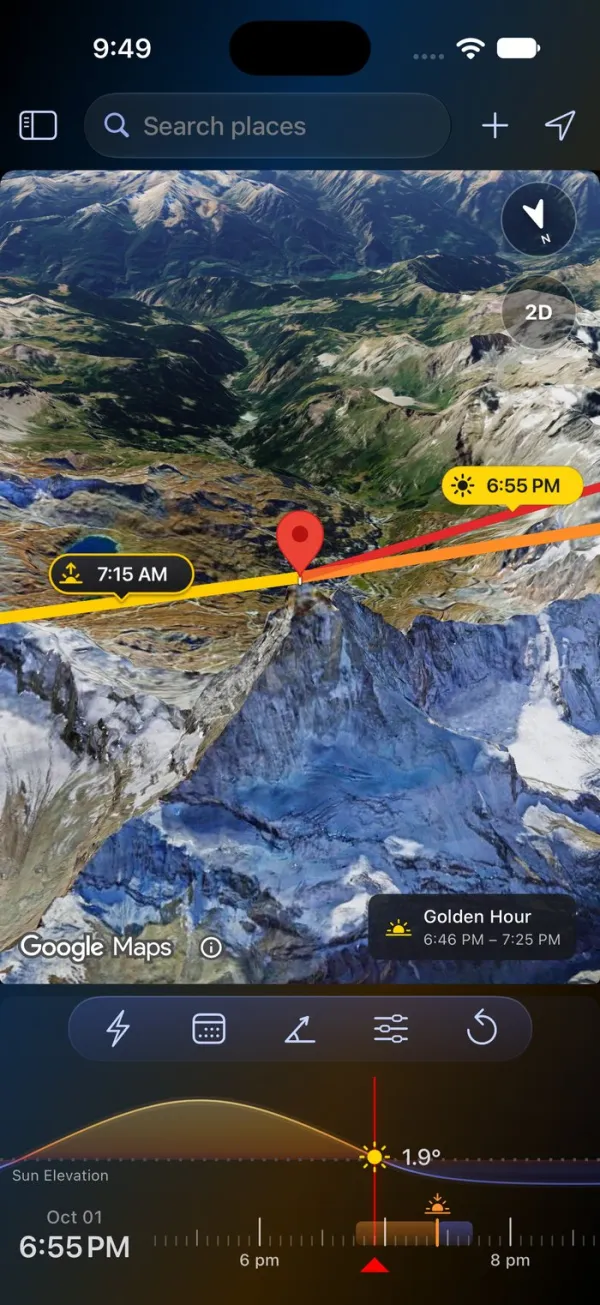
LightPlan is built so you can plan a shot without a tutorial. The map, the sun and moon lines, the light and the timeline are together on one screen, and your first plan takes three steps:
- Put the marker on your subject. Search for a place, or tap the map.
- Pick the day and time. Tap Date, then drag the timeline to the hour.
- Read the light. The lines point to the sun and moon, and a chip on the map says when it's golden or blue hour.
There are no panels to decode before you start. Sun Seeker spreads the same job across a compass screen, a details view, a map and a 3D view. In LightPlan, you stay on the map and drag the time.
That matters on a working shoot: an assistant or a second shooter can pick it up in minutes, and so can a client you show it to. One App Store reviewer put it this way in October: "Works like a charm. Very intuitive."
Beautiful and useful
We think it's a beautiful app, and the design does a job. The timeline is coloured like the light, the Terrain map turns warm at golden hour and cool at blue hour, and Photorealistic 3D looks like the place you're going. You can read the light at a glance, before you've read a number, and it's an app you'll be happy to put in front of a client.
One app on iPhone, iPad and Mac
LightPlan is a single app that runs on iPhone, iPad and Mac, and it's on Android too. Save a property on your phone at the site and it's on your Mac when you're back at your desk, with its view and where you'll stand, synced through iCloud. On the Mac you get the whole planner side by side: your places, the map and every control.
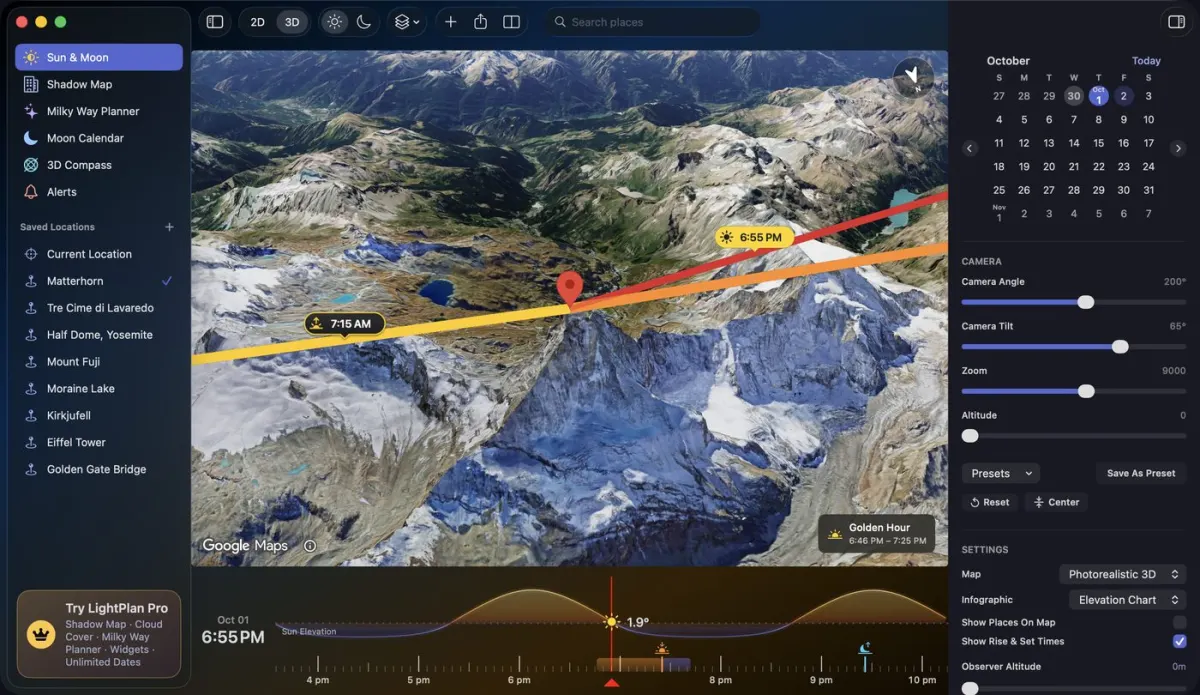
Sun Seeker's phone app covers iPhone and iPad too, but on a Mac it's a different app with a different job. AR Sky View needs a camera to hold up, so it stays on iPhone, iPad and Android.
What it costs
Sun Seeker is a one-time $11.99 on iPhone and iPad and $8.99 on Android. Sun Seeker Pro for Mac is a separate $29.99, so an iPhone and a Mac come to $41.98.
LightPlan is free to use, and that covers the sun over 3D buildings, blue hour, AR Sky View and plan links for today and the next 2 days. Commercial shoots are often booked further out than that, so you'll want LightPlan Pro for any date, Shadow Map, Observer View and the forecasts: $2.99 a month or $19.99 a year, with a free trial. Everything in Free and Pro.
Is it worth the cost?
Sun Seeker is the cheaper app, and you only pay for it once. On iPhone, LightPlan Pro costs $8 more in the first year, then $19.99 a year after that, which is about $1.67 a month.
What that buys is the part of the job Sun Seeker leaves to a site visit. Before you leave the office, you can see which facade the sun reaches on real 3D buildings, see what the neighbouring buildings do to the light, frame the shot at your focal length, check the cloud forecast and send the plan to your client.
So it comes down to how you work. If you mostly check the sun once you're on site, Sun Seeker is good value, and Pro will be hard to justify. If you quote and plan commercial shoots in advance, one wasted trip to a property costs more than a year of Pro. For that work, we think it pays for itself quickly. Pro starts with a free trial, so you can plan a real property with it before you pay anything.
Plan your next property in LightPlan
The sun over real 3D buildings, blue hour and AR Sky View, free on iPhone, iPad, Mac and Android. LightPlan Pro starts with a free trial.

